Which AI Tool best dates old photos?

What AI Really Dates Your Family Photos Best? A Structured Test
You've got boxes of old family photos—some labeled, most not. You know AI tools claim they can analyze visual clues to estimate when a picture was taken, but which one actually delivers? AI is everywhere now, and used on many platforms. And more importantly, how do you get consistent, reliable results instead of wild guesses?
This post documents a systematic test of four major AI platforms (ChatGPT, Gemini, Claude, and Perplexity) using the same family photographs, standardized prompts, and scoring criteria. I tested a universal prompt across all tools and used one close-cropped shot per photo set for each platform, then scored the results on accuracy, evidence quality, citation reliability, and practical usefulness.
What I found surprised me—and the workflow that emerged gives you a repeatable method to get the best possible date estimates from your own collection. Whether you're organizing a family archive, genealogical research, preparing materials for Photo Reminiscence Therapy, or just trying to figure out when Grandma wore that hat, here's what actually works.
In this blog post, I will provide you:
THE TEST RESULTS & WINNER
MY RECOMMENDATION
LIMITATIONS OF EACH AI TOOL
MY RECOMMENDED WORKFLOW
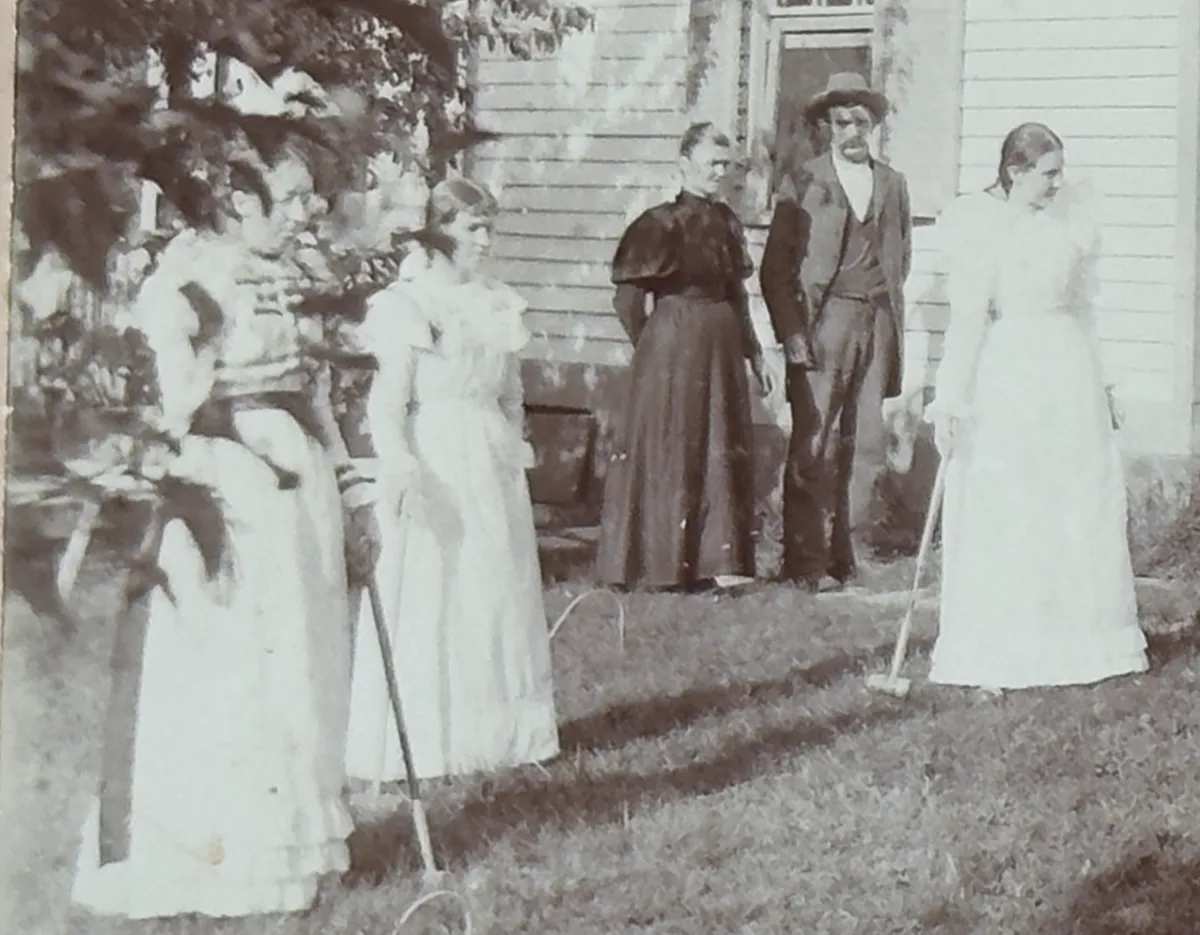
Here are the three sets that I used:
SET 1 (five photos and one crop) - large set at same time, includes clothing and automobile
SET 2 (one photo and one crop) - has ground truth, known date, includes automobile
SET 3 (one photo and one crop) - single photo, using only clothing and house
SET 1 (found in an antiques store in Stephens City, VA)

SET 2 (found in an antiques store in Jonesville, NC)

Note: I did not submit the back of the photo (that shows the date) as part of this test.
SET 3 (found in an antiques store in Arlington, TX)

RESULTS BY PHOTO SET
I want to give you the results up-front, and then all of the data, protocols, and methodology is further below.
✅ Set 1 (Late-1940s, multiple photos + Virginia plate anchor)
This set contained the single strongest “hard anchor” you can ask for in a photo: a Virginia license plate with “1948” clearly visible.
Here’s what happened:
Gemini nailed it: center year 1948, very high confidence.
Perplexity was close and reasonable: center 1949, keeping the range tight around the late 1940s.
ChatGPT drifted earlier (center 1947) — basically “close, but missed the anchor,” which matters in a dating test.
Claude broke completely by misreading the plate (it interpreted it as 1943), which caused the entire estimate to collapse.
Bottom line for Set 1:
If a photo contains readable text (plates, signs, printed dates), the winner is the tool that correctly locks onto it. In this set, Gemini performed best, and Claude failed the most dramatically.
To see the RAW data, click here.
✅ Set 2 (Mid-1950s, one photo + crop + ground truth)
This is the most important set because it includes ground truth — the back of the photo says:
“This is a Kodacolor Print… Week of November 9, 1953.”
That’s a processing date, and in typical family photo workflows, it’s usually close to when the photo was taken. It was not provided to the AI models during the test.
Here’s how the models performed relative to 1953:
Gemini: center 1954 (≈ 1 year off) ✅ best accuracy
Claude: center 1955 (≈ 2 years off)
Perplexity: center 1956 (≈ 3 years off)
ChatGPT: center 1958 (≈ 5 years off)
Bottom line for Set 2:
On the one set where we can actually verify accuracy, Gemini was the closest to truth.
✅ Set 3 (1890s–early 1900s, fashion + house cues, no text anchors)
This set had no license plate, no printed date, no signage — just clothing, house style, and the croquet scene.
What surprised me here is that all four tools converged:
Everyone clustered in the mid-1890s (roughly 1893–1898, center around 1895).
Bottom line for Set 3:
When the era is visually distinctive (like the leg-of-mutton sleeve window), AI can be impressively consistent — even without hard text anchors.

So… Which AI Actually Dates Photos Best?
If we define “best” as closest to ground truth when ground truth exists, then:
✅ Gemini won the Universal Prompt Test.
It performed best on:
Set 1 (where the anchor was obvious)
Set 2 (where we can verify correctness)
and it stayed consistent on Set 3 (where all tools converged)
But “best” also depends on what you care about:
LIMITATIONS OF MODELS
If you want the most accurate date…
✅ Gemini was the most reliable in this test.
If you want a cautious, defensible range…
✅ Perplexity tended to be conservative and coherent (especially on Set 1 and Set 2).
If you want deep narrative reasoning (but accuracy can drift)…
⚠️ ChatGPT often produced rich analysis, but it sometimes missed obvious anchors and drifted.
If you want accuracy under anchor constraints…
⚠️ Claude was the only tool that made a catastrophic anchor error (Set 1 license plate), and once that happened the whole output became unreliable.
GENERAL WARNING:
Watch for reproductions, recreations, and even AI-created photos. Part of the prompt instructs your AI LLM to be aware of this:
### Hard rules (rigor)
4) Watch for traps: hand-me-downs, classic cars kept for decades, retro fashion, renovations, reenactments, later reprints/scans.
Here is an example:

It should surprise no one that this photo should NOT be dated from the 1870's.....
The Big Lesson: AI is Only as Good as the "Anchor" It Reads Correctly
Here’s the simplest truth I learned:
AI photo dating works best when the photo contains a “hard anchor”… and the model reads it correctly.
Hard anchors include:
license plates with a year
printed dates
photo back stamps (Kodak / processing text)
readable signage
newspapers, storefronts, event banners, etc.
Without anchors, you’re relying on “soft cues” (clothes, hairstyles, cars), and those cues:
vary by region,
lag by household,
and can persist for years.
That’s why a single misread license plate can throw off an entire estimate.
MY RECOMMENDATION
✅ Use Gemini (in Thinking Mode) as your primary photo-dating tool based on closest match to ground truth (Set 2) and strongest performance on “hard anchors” (Set 1).
🎯 Core principle: Always hunt hard anchors first (printed dates, plates, signs, photo-back stamps).
🧭 Output you want from Gemini: Primary range + center year + confidence + evidence table + bounds + “what would change my mind.” (See supporting info for the actual prompt)
🧱 Guardrails: Don’t let Gemini “average” soft cues over a hard anchor; treat anchors as dominant evidence.
🔁 Workflow: Run the same structured prompt every time, then do a quick consistency check across photos from the same event.
🧾 When it’s high confidence: When you have readable text or a dated photo-back stamp.
⚠️ When it’s low confidence: Single photo, no text, generic clothes/cars/architecture → expect a wider range.
Why I’m comfortable recommending it based on this test:
Set 2 (ground truth): Gemini landed closest to the verified Kodacolor processing date (Week of Nov 9, 1953).
Set 1 (hard anchor): Gemini correctly locked onto the 1948 Virginia plate, which should dominate the date estimate.
Set 3 (no anchors): Gemini still converged with the other tools into the mid-1890s, which is what you want when you’re relying on fashion/architecture.
In plain English: Gemini best balanced accuracy + discipline around hard evidence in this test.
WORKFLOW RECOMMENDATION
(Using GEMINI in THINKING MODE)
Step 0 — Prep your inputs (2 minutes)
For each “photo event” (same outing / same people / same clothes):
Pick 1–6 images max that clearly show:
faces + clothing
background environment
vehicles (if any)
any readable text (signs, plates, posters)
If available, photograph/scan:
the back of the print
any album caption
any envelope/processing sleeve
PROMPT (PROTOCOL) document: follow the link. It contains the full prompt I designed. Copy it into Google Docs and save it as a markdown (.md) file. When you upload it to your AI tool, it should add like any normal file. However, ChatGPT had some issues, and it rejected the
.mdextension. I simply changed to extension to.txtand it worked. — Gemini will take.mdjust fine, but keep your “protocol file” consistent, if you wish to test different LLMs.
Step 1 — Run the Universal protocol in Gemini (copy/paste)
Use this same structure every time. You’ll get consistent outputs you can compare across sets.
Process (Gemini):
Upload the markdown (.md) or text file.
Upload the photo(s) you want estimated.
Set Gemini mode to "Thinking".
Use this brief prompt: “Read the attached protocol document first. Then analyze the attached photos following the instructions in the protocol document.”
(The protocol document instructs Gemini to analyze a photo set as a single event - assuming that you have properly grouped the photos before upload.)
The protocol instructions force Gemini to behave like an analyst, not a fortune teller.
Step 2 — Force “hard anchors first”
Immediately after Gemini answers, do one follow-up prompt:
Follow-up prompt:
“List all hard anchors you used (plates, signs, printed dates, stamps). If any hard anchor exists, re-weight it as dominant evidence and confirm the estimate doesn’t contradict it.”
This prevents the most common AI failure mode: soft cues overpowering hard proof.
Step 3 — Do a 30-second sanity check
Before you accept the date:
Does the primary range conflict with any visible year/date?
Are the bounds reasonable (not wildly wide without cause)?
Did Gemini suggest specific zooms that would materially tighten the estimate?
If multiple photos: are they internally consistent (same child age, same outfits, same car)?
If the answer to any is “no,” run Step 4.
Step 4 — Tighten the estimate with targeted crops (the “zoom loop”)
Gemini will usually tell you exactly what it needs. Give it 2–5 closeups:
High-value crops to upload:
license plate (full + corners)
car emblem / grille / taillight
shoes + hemline
watch, jewelry, eyeglass frames
signage in background
photo back stamp (Kodak text, lab mark, handwriting)
Then prompt:
Prompt:
“Re-run the analysis using the same protocol, but treat these crops as primary evidence.”
This is the fastest way to move from “pretty good” to “defensible.”
Step 5 — Save results in a repeatable format (for your archive)
For each event, store:
Event ID: (e.g.,
SET2_JonesvilleOverlook)Gemini output: range / center / confidence / key drivers
Anchor(s): plate year / processing stamp / sign text
Action notes: what to crop next time, what remains uncertain
Final chosen label for your library:
1953–1954 (confidence: high)or
c. 1956 (confidence: medium)or
1894–1897 (confidence: medium-high)
This is what makes your system scalable across hundreds of photos.
LINKS:
Raw Data: https://mylegacycloud.com/ai_photo_date_test_results
Prompt link: https://mylegacycloud.com/ai_protocol_no_1